Create a Cost Item Scale Group
Overview
The Cost Item Scale Group includes the information related to the group used in the Cost Item Scale.
Navigation 
By default, you will be in Search Mode.
- Click on the New icon
 (you will then be in Insert Mode).
 - Enter the new Cost Item Scale Group information. Fields with an asterisk
 are mandatory fields.
 - Enter the Code, select the Currency, click on the Active, Salary Scale, Increase Only Seniority Date, as required. Select the Language, enter the Name and Description.
- Code: Cost Item Scale Group unique identification code
- Currency: Currency used by the Cost Item Scale Group
- Active: Active Status - if checked, Cost Item Scale Group is available
- Salary Scale: Salary Scale True/False Indicator
- Increase Only Seniority Date: If checked, only the employees with seniority dates will have salary increases
- Language: Language used
- Name: Name of the Cost Item Scale Group
- Description: Detailed description of the Cost Item Group
- Click on the New icon
 under
under to enter the Cost Item Scale information (refer to Cost Item Scale for more information)
 - Click on the Save and Return icon
 to save the Cost Item Scale information and return to the Cost Item Scale Group, or click on the Discard icon
  to discard the Cost Item Scale information entry and return to the Cost Item Scale Group.
 - Click the individual Select Checkbox (es), under to select and de-select the Cost Item Scale (s), as required, or click the Select All icon
 or Unselect All
  icon, to select or de-select all Cost Item Scale (s), if required.
 - Click the Remove icon
 to remove the selected Cost Item Scale (s), if required
 - Repeat steps 4 to 7 for all required Cost Item Scales.
- Click on the Save icon
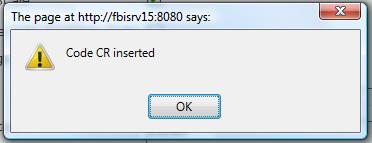
 at the bottom to save your new Cost Item Scale Group information. A window will appear to confirm the new Cost Item Scale Group creation. Click OK to confirm.
 .
.
Cost Item Scale
Navigation (From click the New Icon , under )
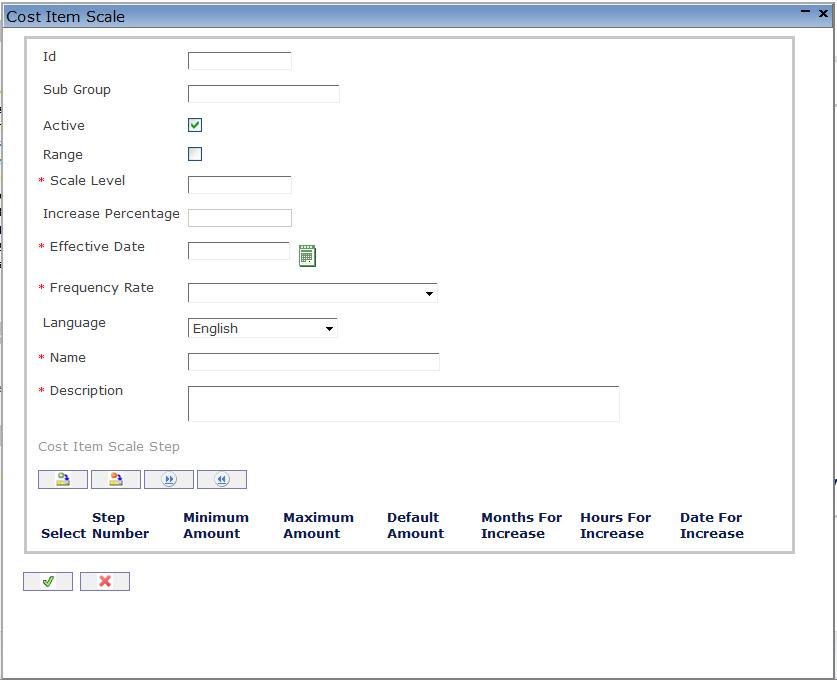
Create a Cost Item Scale
Navigation (From click the New Icon, under )
- Enter the new Cost Item Scale information. Fields with an asterisk are mandatory fields.
- Enter the ID, Sub-Group, click on the Active and Range checkmarks, as required. Enter the Scale Level, Increase Percentage, Effective Date, Frequency Rate, select the Language, and enter the Name and Description.
- ID: Unique Identification Number
- Sub Group: Sub group of the Cost Item Scale.
- Active: Active Status - if checked, Cost Item Scale is available.
- Range: If checked, the Cost Item Scale Level will not be a fixed rate but a Cost Item Scale Level with a range
- Scale Level: Number indicating the Cost Item Scale Level
- Increase Percentage: Percentage of Increase at anniversary date for Cost Item Scales with a minimum-maximum range
- Effective Date: Date at which the Cost Item Scale becomes effective. To enter the date, click on the Calendar icon
 and select the date.
 - Frequency Rate: Type of rate of the Cost Item Scale: Hourly, Daily, Weekly, Monthly, or Annually.
- Language: Language used
- Name: Cost Item Scale Name
- Description: Detailed description of the Cost Item Scale
- Click on the New icon under
 to enter the Cost Item Scale Step information (refer to Cost Item Scale Step for more information).
 - Click the individual Select Checkbox (es), under to select and de-select the Cost Item Scale Step (s), as required, or click the Select All icon or Unselect All icon, to select or de-select all Cost Item Scale Step (s), if required.
- Click the Remove icon to remove the selected Cost Item Scale Steps, from step 4, if required.
- Click on the Save and Return icon to save the Cost Item Scale information and return to the Cost Item Scale Group, or click on the Discard icon to discard the Cost Item Scale information entry and return to the Cost Item Scale Group.
Cost Item Scale Step
Navigation (From click the New Icon, under , and New Icon, under ).
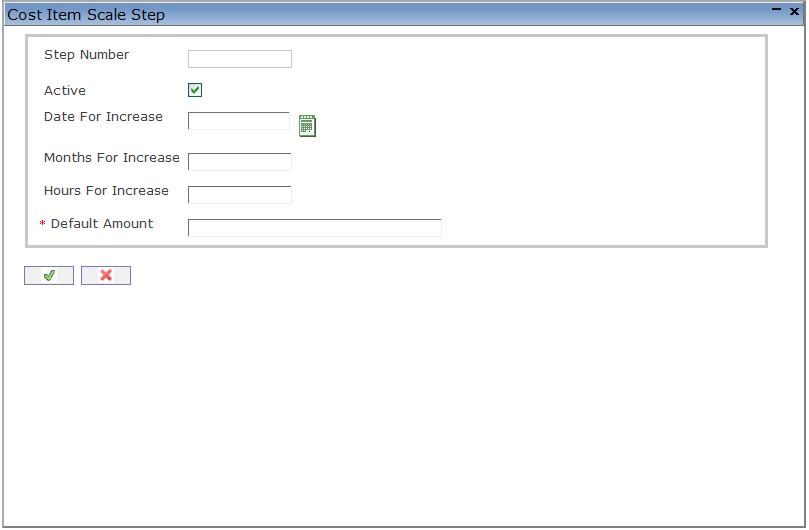
Create a Cost Item Scale Step
Navigation (From click the New Icon, under , and New Icon, under ).
- Enter the new Cost Item Scale Step information. Fields with an asterisk are mandatory fields.
- Click on the Active checkmark, as required, enter the Date For Increase, Months For Increase, or Hours For Increase, as required. Enter the Default Amount, if Range is not selected under Cost Item Scale, or Minimum Amount and Maximum Amount if Range is selected, under Cost Item Scale.
- Active: Active status - if checked, Cost Item Scale Step is available.
- Date For Increase: Date at which the salary will be automatically increased to the next level. To enter the date, click on the Calendar icon and select the date.
- Months For Increase: Number of months prior to a salary increase to the next level.
- Hours For Increase: Number of hours prior to a salary increase to the next level.
- Default Amount: Cost Item Scale Step Default Amount..
- Minimum Amount: Cost Item Scale Minimum Amount.
- Maximum Amount: Cost Item Scale Maximum Amount.
- Click on the Save and Return icon to save the Cost Item Scale Step information and return to the Cost Item Scale, or click on the Discard icon to discard the Cost Item Scale Step information entry and return to the Cost Item Scale Group.
- Repeat steps 1 to 3 for all required Cost Item Scale Steps.