Performance Appraisal Schedule
Overview
The frequency and length of a performance appraisal depends on the job. For example, an administrator may be evaluated every 6 months because it is assumed that they will be able to improve their performance in that time frame and can be evaluated as such. A manager may only get evaluated every year because it takes them longer to show measurable improvements in management.
In this application the performance appraisal schedules contains the list of planned schedules by date. This is where management will decide how often a performance appraisal will be conducted. For example, common schedules could be quarterly, Semi-Annual, etc.
Navigation 
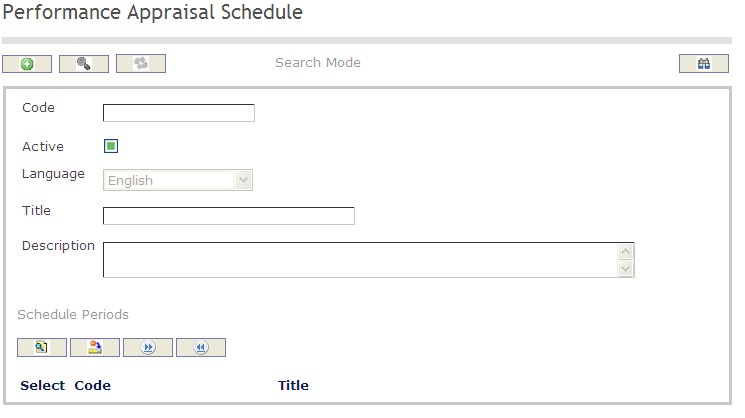
How to SEARCH:
- Enter the information to be used as retrieval criteria in the appropriate field (s). If you prefer to see a list of all performance appraisal schedule leave all fields blank.
- Click on the Find icon
 .
.
The Performance Appraisal Schedule screen includes the following fields:
| Field | Definition |
| Code | Unique identification code of the Performance Appraisal Schedule. |
| Active | Active Status - if checked, Performance Appraisal Schedule is available. |
| Language | language used |
| Title | Name of the Performance Appraisal Schedule |
| Description | Description of the Performance Appraisal Schedule |
Create a Performance Appraisal Schedule
Performance appraisal schedules contains the list of planned schedules. This is where management will decide how often a performance appraisal will be conducted.
To CREATE performance appraisal schedules follow the steps below:
Navigation 
- Click on the New icon
 (you will then be in Insert Mode).
 - Enter the new Performance Appraisal Schedule information. Fields with an asterisk
 are mandatory fields.
 - Enter the Code, click on the Active checkmark, and select the Language, as required.
- Code: Unique identification code of the Performance Appraisal Schedule.
- Active: Active Status - if checked, Performance Appraisal Schedule is available.
- Language: language used
4. Enter Title and Description of Performance Appraisal Schedule
- Title: Name of the Performance Appraisal Schedule
- Description: Description of the Performance Appraisal Schedule
To ADD Performance Appraisal Schedule Periods to the Performance Appraisal Schedules, if required:
- Click on Lookup icon
 , and enter the Performance Appraisal Schedule Period information, or leave the Performance Appraisal Schedule Period information blank to retrieve all Performance Appraisal Schedule Periods.
 - Click Find icon

- Click the individual Select Checkbox (es) to select and de-select the Performance Appraisal Schedule Periods, as required.
- Repeat steps 1, 2 and 3 for all required Performance Appraisal Schedule Periods.
- Click the Return icon
 to return to the Performance Appraisal Schedule screen, or click the Discard button
  to discard the selection entry and return to Performance Appraisal Schedule screen.
 - Click the individual Select Checkbox (es) to select and de-select the Performance Appraisals Schedule Period(s), as required, or click the Select All icon
 or Unselect All
  icon, to select all Performance Appraisal Schedule Periods or de-select all Performance Appraisal Schedule Periods, if required.
 - Click the Remove icon to remove the selected Performance Appraisal Schedule Period information, if required.
To ADD new Performance Appraisal Schedule Period, refer to Performance Appraisal Schedule Periods.
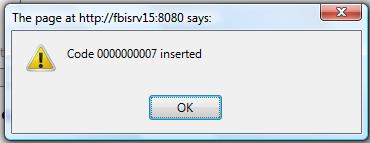
Click on the Save icon  at the bottom of the Performance Appraisal Schedule page to save your new Performance Appraisal Schedule information. A window will appear to confirm.
Delete a Performance Appraisal Schedule
Performance appraisal schedules contains the list of planned schedules.
To DELETE performance appraisal schedules follow the steps below:
Note: The system will not allow schedules that are being utilized in an appraisal process to be deleted.
Navigation 
By default, you will be in Search Mode.
- Find the Performance Appraisal Schedule you want to Delete
- Enter the information to be used as retrieval criteria in the appropriate field(s). If you prefer to see all Performance Appraisal Schedules, leave all fields blank.
- Click Find .
- Select the Performance Appraisal Schedule you want to Delete.
- Click on the Delete icon
 .
. - A window will appear asking you to confirm

- Click OK to confirm and delete the Performance Appraisal Schedule
- A window will be displayed confirming the Performance Appraisal Schedule has been deleted

To Verify that the Performance Appraisal Schedule has been Deleted:
- Click on the Search icon

- Enter the Performance Appraisal Schedule information in the appropriate field (s).
- Click on the Find icon
- This window will appear

Modify a Performance Appraisal Schedule
Performance appraisal schedules contains the list of planned schedules. This is where management will decide how often a performance appraisal will be conducted.
To MODIFY performance appraisal schedules follow the steps below:
Navigation 
By default, you will be in Search Mode.
- Enter the information to be used as retrieval criteria in the appropriate field(s).
If you prefer to see the list of all Performance Appraisal Schedule, leave all fields blank. - Click on the Find icon . The list of Performance Appraisal Schedules meeting the retrieval criteria will appear.
- Click on the Performance Appraisal Schedule you want to modify.
You will then be in Update/Delete Mode. - Make the necessary modification(s).
- Click on the Update icon
 at the bottom of the screen to save your modifications. A window will appear to confirm the modification. Click OK to confirm.