Trainee Feedback
Overview
It is important for the trainees to provide feedback on the training course so that management can make the necessary adjustments. The trainee feedback screen contains the trainee's evaluation of the training course. The evaluation will be done using a training feedback template as defined by the course creator.
Navigation
Trainee Feedback screen field and tabs
| Fields | Definition |
| Trainee | unique identification code for the Trainee |
| Trainee Course Feedback tab | To give feedback on the training course. |
| Trainee Trainer Feedback tab | To give feedback on the trainer. |
Create Trainee Feedback
The Trainee Feedback screen contains the trainee's evaluation of the training course.
To CREATE Trainee Feedback, follow the steps below:
Navigation 
By default, you will be in Search Mode.
- Click on the New icon
 (you will then be in Insert Mode).
 - Enter the new Trainee Feedback information. Fields with an asterisk
 are mandatory fields.
 - To enter the Trainee click on the Lookup icon
 , click on Find icon
  to retrieve the Training Course list, then select the Training Course.
- Trainee: unique identification code for the Trainee
4. Click on the New icon  under
under  to enter the Trainee Course Feedback (refer to Trainee Course Feedback for more information).
5. Click on the Save and Return icon  to save the Trainee Course Feedback information and return to the Trainee Feedback screen, or click on the Discard icon
  to discard the Trainee Course Feedback entry and return to the Trainee Feedback screen.
6. Click the individual Select Checkbox (es), under to select and de-select the Trainee Course Feedback, as required, or click the Select All icon  or Unselect All
  icon, to select or de-select all Trainee Course Feedback, if required.
7. Click the Remove icon  to remove the selected Trainee Course Feedback, if required
8. Repeat steps 4 to 7 for all required Trainee Course Feedback.
9. Click on the New icon under  to enter the Trainee Trainer Feedback (refer to Trainee Trainer Feedback for more information).
10. Click on the Save and Return icon to save the Trainee Trainer Feedback information and return to the Trainee Feedback screen, or click on the Discard icon to discard the Trainee Trainer Feedback entry and return to the Trainee Feedback screen.
11. Click the individual Select Checkbox (es), under to select and de-select the Trainee Trainer Feedback, as required, or click the Select All icon or Unselect All icon, to select or de-select all Trainee Trainer Feedback, if required.
12. Click the Remove icon to remove the selected Trainee Trainer Feedback, if required
13. Repeat steps 9 to 12 for all required Trainee Trainer Feedback.
Click on the Save icon  at the bottom of the Trainee Feedback page to save your new Trainee Feedback information. A window will appear to confirm.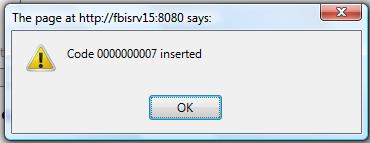
Trainee Course Feedback
Navigation  click the New Icon
 under
under 
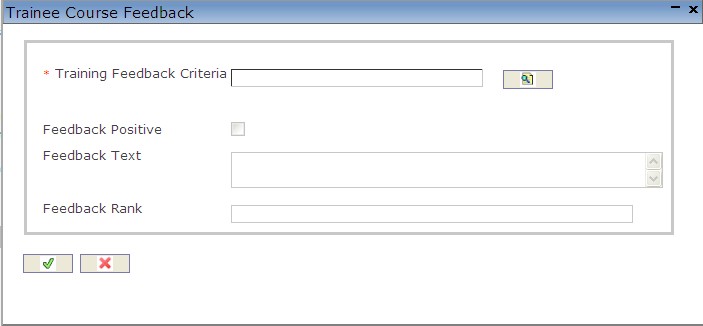
Create Trainee Course Feedback
1. Enter the new Trainee Course Feedback information. Fields with an asterisk are mandatory fields,
2. To enter the Training Feedback Criteria, click on the Lookup icon , click on Find icon to retrieve the Training Feedback Criteria list, then select the Training Feedback Criteria.
3. Check Feedback Positive, as required.
4. Enter the Feedback Text and Feedback Rank, as required.
5. Click on the Save and Return icon to save the Training Course Criteria information and return to the Trainee Trainer Feedback, or click on the Discard icon to discard the Training Course Criteria information and return to the Trainee Trainer Feedback.
Trainee Trainer Feedback
Navigation click the New Iconunder 
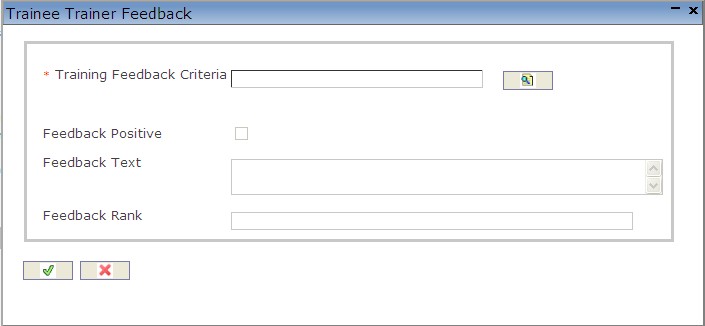
Create Trainee Trainer Feedback
1. Enter the new Trainee Trainer Feedback information. Fields with an asterisk are mandatory fields,
2. To enter the Training Feedback Criteria, click on the Lookup icon , click on Find icon to retrieve the Training Feedback Criteria list, then select the Training Feedback Criteria.
3. Check Feedback Positive, as required.
4. Enter Feedback Text and Feedback Rank, as required.
5. Click on the Save and Return icon to save the Training Feedback Criteria information and return to the Trainee Trainer Feedback, or click on the Discard icon to discard the Training Feedback Criteria information and return to the Trainee Trainer Feedback.
Delete Trainee Feedback
The Trainee Feedback screen contains the trainee's evaluation of the training course.
To DELETE Trainee Feedback, follow the steps below:
Navigation 
By default, you will be in Search Mode.
- Find the Trainee Feedback you want to Delete
- Enter the information to be used as retrieval criteria in the appropriate field(s). If you prefer to see all Trainee Feedback, leave all fields blank.
- Click Find .
- Select the Trainee Feedback you want to Delete.
- Click on the Delete icon
 .
. - A window will appear asking you to confirm

- Click OK to confirm and delete the Trainee Feedback
- A window will be displayed confirming the Trainee Feedback has been deleted

To Verify that the Trainee Feedback has been Deleted:
- Click on the Search icon

- Enter the Trainee Feedback information in the appropriate field (s).
- Click on the Find icon
- This window will appear

Modify Trainee Feedback
The Trainee Feedback screen contains the trainee's evaluation of the training course.
To MODIFY Trainee Feedback, follow the steps below:
Navigation 
By default, you will be in Search Mode.
- Enter the information to be used as retrieval criteria in the appropriate field (s). If you prefer to see a list of all Trainee Feedback , leave all fields blank.
- Click on the Find icon
 .
. - Click on the Trainee Feedback you want to modify. You will then be in Update/Delete Mode.
- Make the necessary modifications. To add or remove Trainee Course Feedback refers to Trainee Course Feedback. To add or remove Trainee Trainer Feedback refers to Trainee Trainer Feedback.
- Click on the Update icon
 at the bottom of the screen to save your modifications. A window will appear to confirm the modification. Click OK to confirm.
