Employee Statistical Report
Overview
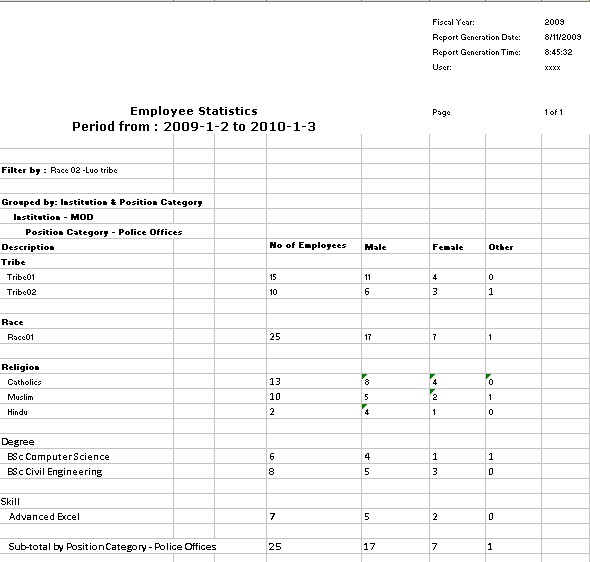
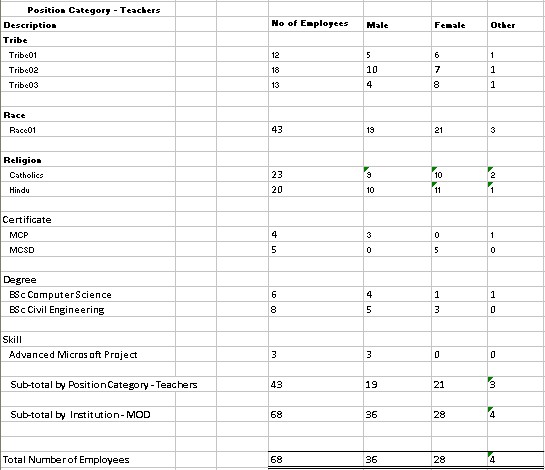
The Employee Statistical report allows the user to view the count of employees per Tribe, Race, Religion, Certificate, Degree & Skill for a particular Institution and/or Position Category.
An example of the report is shown below.
Navigation 
Definition of Report Fields
The Employee Statistics Report includes the following fields:
Report Field | Description |
Report Date | Date of report generation automatically generated by the system. |
Report Time | Time of report generation automatically generated by the system. |
User | User who generates the report. |
Page | Page Number. |
Fiscal Year | The Financial Year report for a specific year. |
Pay Code | The code to distinguish an employee's pay group which differentiates the pay frequencies. |
Pay Period | The pay period number for the period deduction. |
Position Category | Generic positions that are managed by the public service and are generic. |
Tribe | Tribe of Employee. |
Race | Race of Employee. |
Religion | Religion of Employee. |
Certificate | The certificates associated with the personal learning plan. |
| Degree | The description of Education degree. |
| Skill | Skills that can be mandatory or desirable for a given Generic/Employee position. |
| Group By | Used to group report information by Employee, Institution, Value. |
Generation of the Report
The Employee Statistics Report allows the user to view the count of employees per Tribe, Race, Religion, Certificate, Degree & Skill for a particular Institution and/or Position Category.
To GENERATE the Employee Statistics Report, follow the steps below:
Navigation
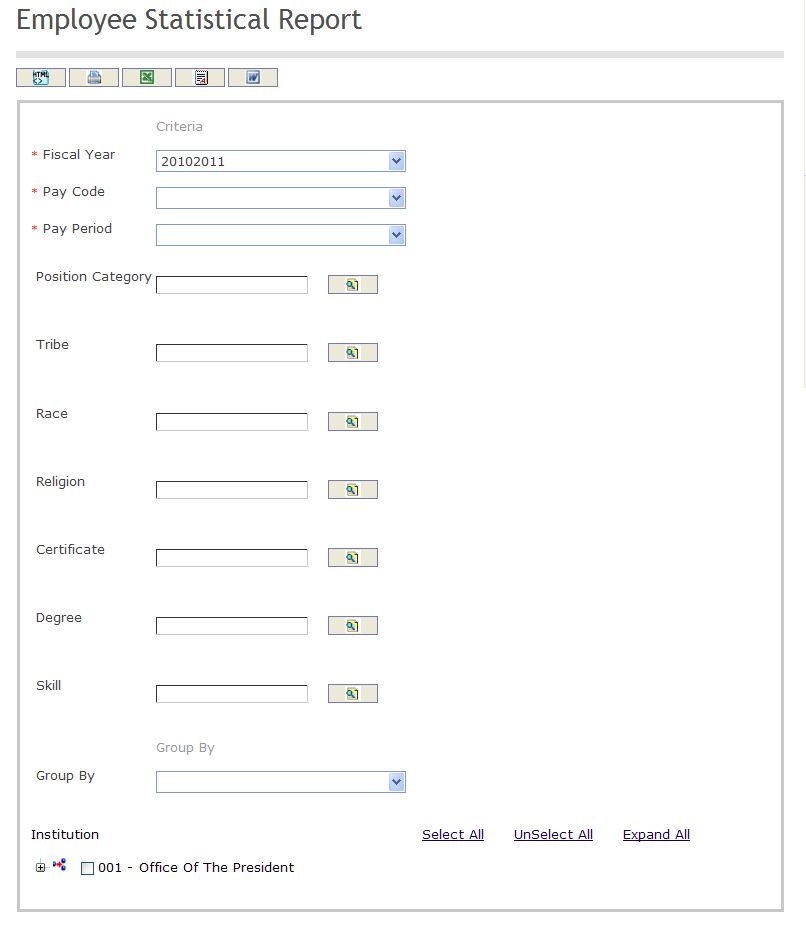
The Employee Statistics Report includes the following filter criteria available for the report:
- Fiscal Year - Select a Fiscal Year from the drop-down menu.
- Pay Code - Select a Pay Code from the drop-down menu.
- Pay Period - Select a Pay Period from the drop-down menu.
- Position Category -Position Category (optional parameter) that can be selected using the Lookup icon
 , and Find icon
  to retrieve the Position Category. If selected, the report will include the selected Position Category and all Position Category below the selected unit. Refer to Position Category for more information.
 - Tribe -Tribe (optional parameter) that can be selected using the Lookup icon , and Find icon to retrieve the Tribe. If selected, the report will include the selected Tribe and all Tribe below the selected unit. Refer to Tribe for more information.
- Race -Race (optional parameter) that can be selected using the Lookup icon , and Find icon to retrieve the Race. If selected, the report will include the selected Race and all Race below the selected unit. Refer to Race for more information.
- Religion -Religion (optional parameter) that can be selected using the Lookup icon , and Find icon to retrieve the Religion. If selected, the report will include the selected Religion and all Religion below the selected unit. Refer to Religion for more information.
- Certificate -Certificate (optional parameter) that can be selected using the Lookup icon , and Find icon to retrieve the Certificate. If selected, the report will include the selected Certificate and all Certificate below the selected unit. Refer to Certificate for more information.
- Degree -Degree (optional parameter) that can be selected using the Lookup icon , and Find icon to retrieve the Degree. If selected, the report will include the selected Degree and all Degree below the selected unit. Refer to Degree for more information.
- Skill -Skill (optional parameter) that can be selected using the Lookup icon , and Find icon to retrieve the Skill. If selected, the report will include the selected Skill and all Skill below the selected unit. Refer to Skill for more information.
- Group By - Select a Group By from the drop-down menu.
If all filter criteria are left blank, all Fiscal Year, Pay Code, Pay Period, Position Category, Tribe, Race, Religion, Certificate, Degree, Skill and Group By will be included in the Report, as well as the Employee Statistics allowed by the report user security profile.
The report can be exported in HTML, PDF, MS Excel, RTF and MS Word formats, prior to printing, using the  ,
,  ,
,  ,
,  , and
, and  icons.