Generation of the Report
The Payroll Exceptions for Cost Items & Deductions is a report that will allow users to visualize employees whose Cost Items and/or Deductions per period have been updated with a corrected amount after the initial Payroll Calculation was executed but when the pay period was not yet closed at the time the change was done.
To GENERATE the Payroll Exceptions for Cost Items and Deductions Report, follow the steps below:
Navigation 
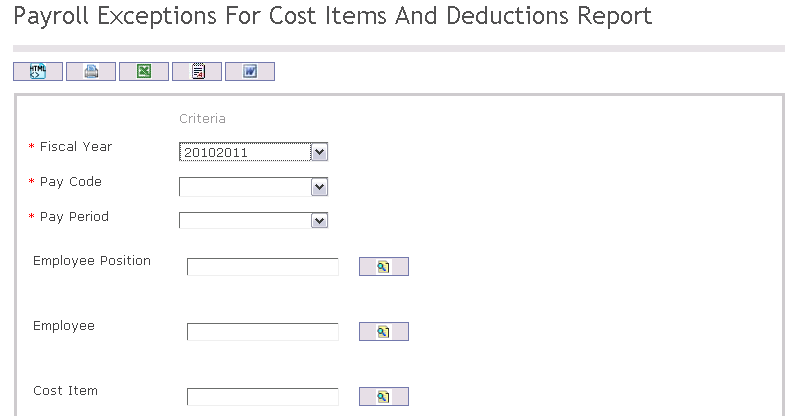
The Payroll Exceptions for Cost Items and Deductions Report includes the following filter criteria available for the report:
- Fiscal Year - Select Fiscal Year from drop-down menu
- Pay Code - Select Pay Code from drop-down menu
- Pay Period - Select Pay Period from drop-down menu
- Employee - To enter the Employee, (optional field) click on the Lookup icon
 , click on Find icon
  to retrieve the Employee list, then select the Employee
 - Employee Position - To enter the Employee Position, (optional field) click on the Lookup icon , click on Find icon to retrieve the Employee Position list, then select the Employee Position
- Cost Item - To enter the Cost Item, (optional field) click on the Lookup icon , click on Find icon to retrieve the Cost Item list, then select the Cost Item
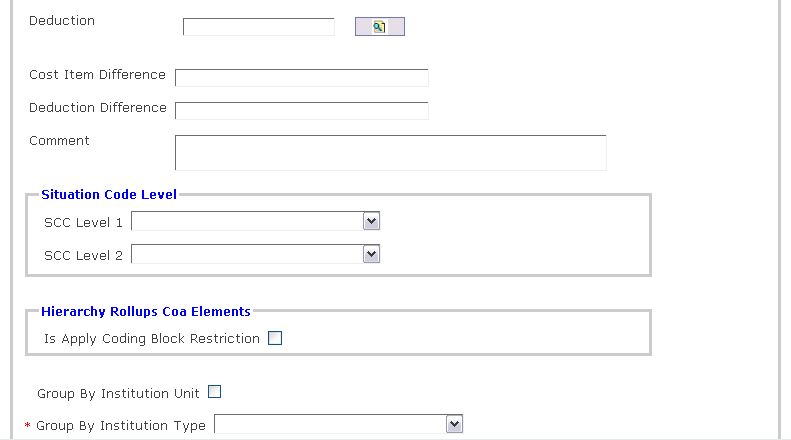
- Deduction - To enter the Deduction, (optional field) click on the Lookup icon , click on Find icon to retrieve the Deduction list, then select the Deduction
- Cost Item Difference - Enter Cost Item Difference
- Deduction Difference - Enter Deduction Difference
- Comment - Additional remarks
- SCC Level 1 - Select SCC Level 1 from drop-down menu
- SCC Level 2 - Select SCC Level 2 from drop-down menu
- Is Apply Coding Block Restriction - Check the checkbox to apply a coding block restriction on this report.
- Select Group By Organization Unit
- Group By Institution Type - Select Group By Institution Type from drop-down menu
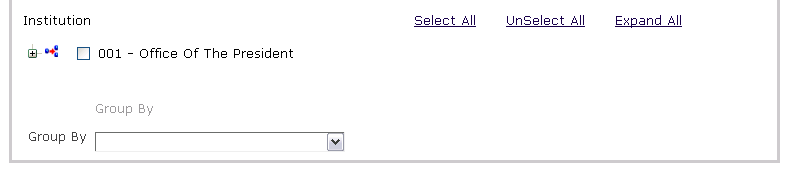
- Group By - Select Group By from drop-down menu
If all filter criteria are left blank, all Employees, Employee Positions, Cost Items, Deductions will be included in the Report allowed by the report user security profile.
The report can be exported in HTML, PDF, MS Excel, RTF and MS Word formats, prior to printing, using the  ,
,  ,
,  ,
,  , and
, and  icons.