Generation of the Report
The Open Position Report is designed to generate all open position records in the organization.
To GENERATE the Open Position Report, follow the steps below:
Navigation 
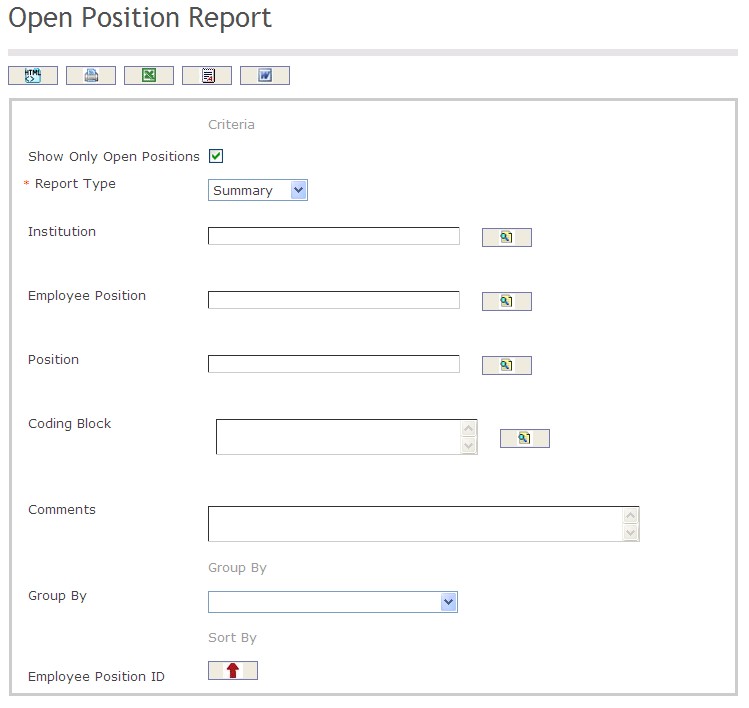
The Open Position Report includes the following filter criteria available for the report:
Enter the new Open Position Report information. Fields with an asterisk  are mandatory fields.
- Show Only Open Positions: Click the checkbox, as required.
- Report Type: (mandatory parameter) Select the preferred report type using the drop-down box, detailed or summary.
- Institution: Institution unit (optional parameter) that can be selected using the Lookup icon
 , and Find icon
  to retrieve the Institution unit. If selected, the report will include the selected Institution unit and all Institutions below the selected unit. Refer to Institutions for more information.
 - Employee Position: Employee Position (optional parameter) that can be selected using the Lookup icon , and Find icon to retrieve the Employee Position. If selected, the report will include the selected Employee Position and all Employee Positions below the selected unit. Refer to Employee Position for more information.
- Position: Position unit (optional parameter) that can be selected using the Lookup icon , and Find icon to retrieve the Position. If selected, the report will include the selected Position and all Positions below the selected unit. Refer to Generic Position for more information.
- Coding Block: Coding Block unit (optional parameter) that can be selected using the Lookup icon , and Find icon to retrieve the Coding Block unit. If selected, the report will include the selected Coding Block unit and all Coding Blocks below the selected unit.
- Comments: Enter comments related to the report in the space provided.
- Group By: Select a Group By value from the drop-down menu.
- Sort By: Sort the Employee Position ID by the preferred ascending and descending order using the red arrow icon

The report can be exported in HTML, PDF, MS Excel, RTF and MS Word formats, prior to printing, using the  ,
,  ,
,  ,
,  , and
, and  icons
icons