Generation of the Report
The Detailed Cost Item/Deduction Per Period report allows the user to view the list of employees who obtained the selected Cost Item/Deduction for the specified Pay Period.
To GENERATE a Detailed Cost Item/Deduction Per Period Report, follow the steps below:
Navigation 
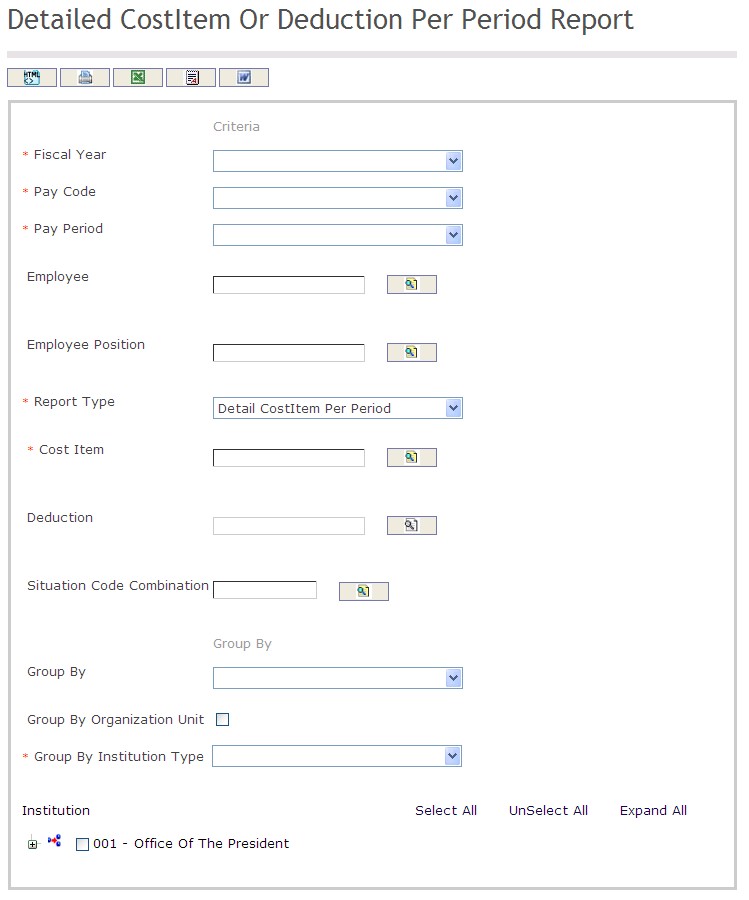
The Detailed Cost Item / Deduction Per Period Report includes the following filter criteria available for the report:
- Fiscal Year - Select Fiscal Year from drop-down menu
- Pay Code - Select Pay Code from drop-down menu
- Pay Period - Select Pay Period from drop-down menu
- Employee - To enter the Employee, (optional field) click on the Lookup icon
 , click on Find icon
  to retrieve the Employee list, then select the Employee
 - Employee Position - To enter the Employee Position, (optional field) click on the Lookup icon , click on Find icon to retrieve the Employee Position list, then select the Employee Position
- Report Type - Select Report Type from drop-down menu
- Cost Item - To enter the Cost Item, (optional field) click on the Lookup icon , click on Find icon to retrieve the Cost Item list, then select the Cost Item
- Deduction - To enter the Deduction, (optional field) click on the Lookup icon , click on Find icon to retrieve the Deduction list, then select the Deduction
- Situation Code Combination - To enter the Situation Code Combination, (optional field) click on the Lookup icon , click on Find icon to retrieve the Situation Code Combination list, then select the Situation Code Combination
- Enter Group By information
- Group By - Select Group By from drop-down menu
- Select Group By Organization Unit
- Group By Institution Type - Select Group By Institution Type from drop-down menu
If all filter criteria are left blank, all Employees, Employee Positions, Cost Items, Deductions, Situation Code Combinations, will be included in the Report allowed by the report user security profile.
The report can be exported in HTML, PDF, MS Excel, RTF and MS Word formats, prior to printing, using the  ,
,  ,
,  ,
,  , and
, and  icons.