Generation of the Report
The Contract Claims Report shows a list of Contract Claims.
To GENERATE the Contract Claims Report, follow the steps below:
Navigation 
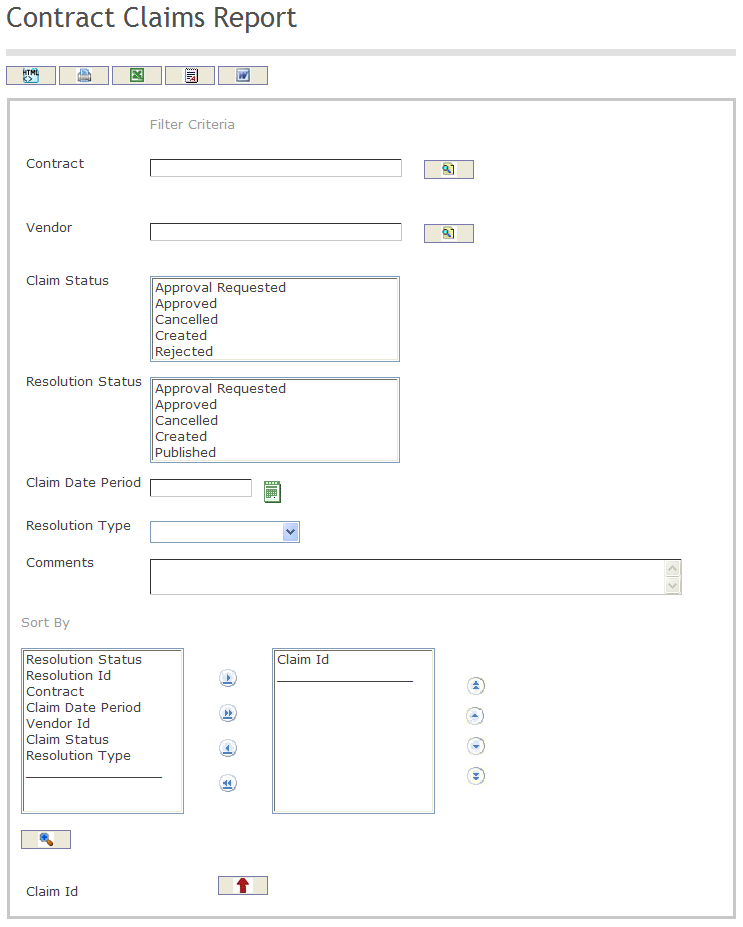
The Contract Claims Report includes the following filter criteria available for the report:
- Contract - Contract unit (optional parameter) that can be selected using the Lookup icon
 , and Find icon
  to retrieve the Contract unit. If selected, the report will include the selected Contract unit and all Contracts below the selected unit. Refer to Managed Contract for more information.
 - Vendor - Vendor unit (optional parameter) that can be selected using the Lookup icon , and Find icon to retrieve the Vendor unit. If selected, the report will include the selected Vendor unit and all Vendors below the selected unit. Refer to Vendors for more information.
- Claim Status - Select a Claim Status from the options available for selection.
- Resolution Status - Select a Resolution Status from the options available for selection.
- Claim Date Period - Claim Date Period (optional parameter) that can be selected by using the calendar icon

- Resolution Type - Select the Resolution Type from the drop-down menu.
- Comments - Enter the Comments related to the generation of the report
- Sort By - Click the
 ,
,  ,
, ,
,  icons to add and remove filter criteria to / from the selected list and click the
  ,
,  ,
,  ,
,  icons to move the items in the selected list up and down to put them in the desired order of appearance. Sort the Claim ID by the preferred ascending and descending order using the red arrow icon
If all filter criteria are left blank, all Contracts, Vendors, Claim Statuses, Resolution Statuses, Claim Dates Period, Resolution Types, and Comments will be included in the Report, as well as all the Contracts, Vendors, Claim Statuses, Resolution Statuses, Claim Dates Period, Resolution Types, and Comments allowed by the report user security profile.
The report can be exported in HTML, PDF, MS Excel, RTF and MS Word formats, prior to printing, using the  ,
,  ,
,  ,
,  , and
, and  icons.