
- Human Resources
- Support Entities
- Position Management
- Batch Update
- Disciplinary
- Employee Management
- Employee
- Beneficiary
- Change Date Of Birth
- Recruitment Management
- Employee Relationship Type
- Training Management
- Knowledge Area
- Performance Appraisal Management
- Assignment Management
- Organization Management
- Succession Planning
- Promotion Management
- Time & Attendance Management
- Leave Management
- Retirement Benefit Management
- Termination of Employment
- Travel & Subsistence Management
- Financial Disclosure
- Budget Planning For Salaries
- Export HR Data
- Reports
- PMIS Interface
- External Recruitment
- Help Function
- Employee Self Service
 English
 Español
Beneficiary
Thu, 2010-12-23 12:23 — slind
Overview
This screen represents the personal information related to a specific beneficiary.
Navigation 
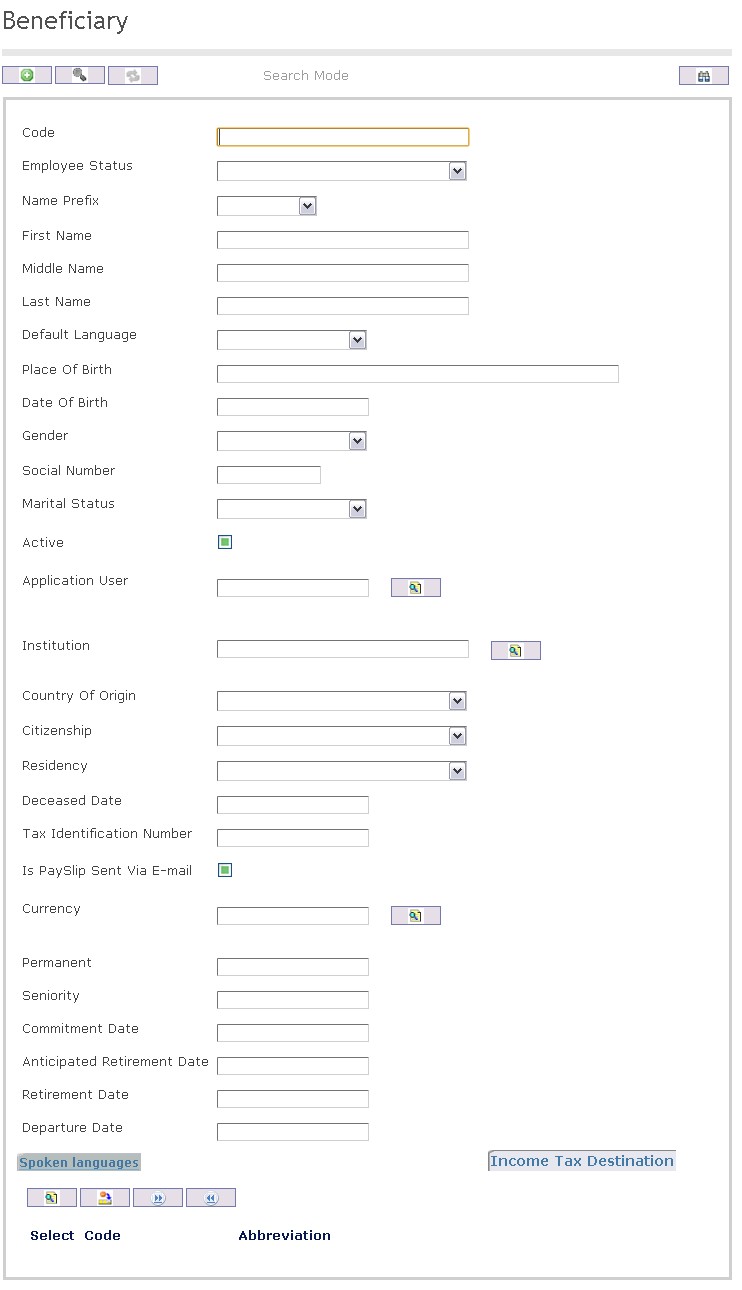
How to SEARCH:
- Enter the information to be used as retrieval criteria in the appropriate field (s). If you prefer to see a list of all Beneficiaries, leave all fields blank.
- Click on the Find icon
 .
.
The Beneficiary screen includes the following fields:
| Report Fields | Description |
| Code | Unique identification code of the beneficiary. This value is system generated and non-editable |
| Employee Status | This is the status of the employee record. The status will be set to ‘CREATED’ when initially creating a beneficiary record. |
| Prefix | Prefix of Name of Beneficiary |
| First Name | First Name of Beneficiary |
| Middle Name | Middle Name of Beneficiary |
| Last Name | Last Name of Beneficiary |
| Default Language | Language chosen of Beneficiary |
| Date of Birth | Birthday of Beneficiary |
| Place of Birth | Location of Birth of Beneficiary |
| Gender | Gender of Beneficiary |
| Social Number | Social Number of Beneficiary |
| Marital Status | Marital status of the Beneficiary |
| Active | If checked, Beneficiary is active |
| Application User | Refers to the User in the system |
| Institution | Defines the organization of the Beneficiary |
| Country of Origin | Country of Origin of Beneficiary |
| Citizenship | Citizenship of Beneficiary |
| Residency | Country of Residency of Beneficiary |
| Race | Race of Beneficiary |
| Religion | Religion of Beneficiary |
| Tribe | Tribe of Beneficiary |
| Deceased Date | Date of death of Beneficiary |
| Tax Identification Number | Tax Identification Number |
| Is Payslip Sent Via E-mail | If checked, the play slip will be sent by e-mail |
| Currency | Refers to a particular country currency, for example the US dollar, or to the coins and bank notes |