
FreeBalance Accountability Suite
Buscar
Inicio de sesión
 English
 Français
 монгол
 Português
 Español
Generation of the Report
Lun, 2010-11-22 17:25 — jcarr
The Gross Salary Gap Report allows the user to view employee’s gross salary gap between 2 selected periods.
To GENERATE a Gross Salary Gap Report, follow the steps below:
Navigation 
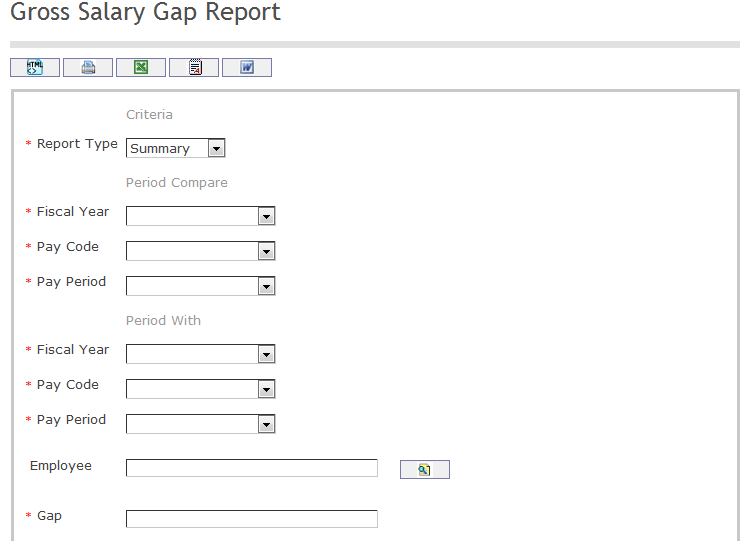
The Gross Salary Gap Report includes the following filter criteria available for the report:
- Report Type: Select Report Type Status from the drop-down menu. Options are 'Summary' or 'Detail.'
- Specify Period Compare details.
- Fiscal Year: Select Fiscal Year from the drop-down menu
- Pay Code: Select Pay Code from the drop-down menu
- Pay Period: Select Pay Period from the drop-down menu
- Specify Period Compare details.
- Fiscal Year: Select Fiscal Year from the drop-down menu
- Pay Code: Select Pay Code from the drop-down menu
- Pay Period: Select Pay Period from the drop-down menu
- Employee - Employee unit (optional parameter) that can be selected using the Lookup icon
 , and Find icon
  to retrieve the Employee. If selected, the report will include the selected Employee and all Employees below the selected unit. Refer to Employee for more information.
 - Gap - Enter Gap
If all filter criteria are left blank, all Employees allowed by the report will be included.
The report can be exported in HTML, PDF, MS Excel, RTF and MS Word formats, prior to printing, using the  ,
,  ,
,  ,
,  , and
, and  icons.