
FreeBalance Accountability Suite
Buscar
Inicio de sesión
 English
 Français
 монгол
 Português
 Español
Generation of the Report
Jue, 2010-12-30 11:46 — rnur
Overview
This report generates a Performance Monitoring Form that includes the following information: Name, Job title, Directorate / Section / Department (organization/institution), Key target areas for the month/year, Achievements and shortfalls, Action plan and way forward to meet shortfalls, and Employee and manager signatures.
To GENERATE this report, follow the steps below:
Navigation 
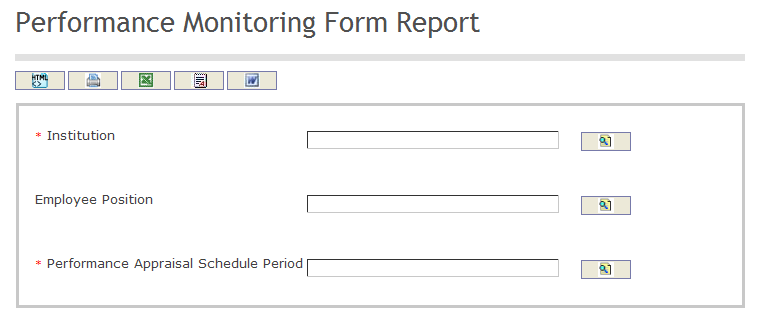
The Performance Monitoring Form Report includes the following filter criteria available for the report:
- Institution - Institution unit (optional parameter) that can be selected using the Lookup icon
 , and Find icon
  to retrieve the Institution unit. If selected, the report will include the selected Institution unit. Refer to Instituitons for more information.
 - Employee Position - Employee Position unit (optional parameter) that can be selected using the Lookup icon , and Find icon to retrieve the Employee Position unit. If selected, the report will include the selected Employee Position unit. Refer to Employee Position for more information.
- Performance Appraisal Schedule Period - Performance Appraisal Schedule Period unit (optional parameter) that can be selected using the Lookup icon , and Find icon to retrieve the Performance Appraisal Schedule Period unit. If selected, the report will include the selected Performance Appraisal Schedule Period unit. Refer to Performance Appraisal Schedule for more information.
If all filter criteria are left blank, all Institutions, Employee Positions, and Performance Appraisal Schedule Periods will be included in the Report, as well as the Institutions, Employee Positions, and Performance Appraisal Schedule Periods allowed by the report user security profile.
The report can be exported in HTML, PDF, MS Excel, RTF and MS Word formats, prior to printing, using the  ,
,  ,
,  ,
,  , and
, and  icons.