
 English
 Français
Appraisal Assigned to Me
Review a Performance Agreement:
Overview
Within Employee Self Service, an employee may be asked to conduct feedback for another employee's performance appraisal.
To review my Performance appraisal
Go to Menu -> Self Service -> Performance Appraisal -> Appraisal Assigned to Me
1. Click on the Find  icon. Your Performance Appraisal will be displayed.
2. It is possible to enter a comment in the Employee Comments field.
3. Once completed, click on the Update  icon.
icon.
To do a Self-assessment (or to evaluate a peer or a subordinate)
Go to Menu -> Self Service -> Performance Appraisal -> Appraisal Assigned to Me
1. Click on the Find icon.
2. Enter scores for each scoring criteria previously defined.
3. Click on the Scores Tab, an select a scoring criteria. A new window will display.
4. Enter the score in the score field.
5. Enter the comments in the Feedback Box.
6. Click on the Update and Return icon. Do the same for each scoring criteria.
7. Once completed, click on the Update icon.
Example:
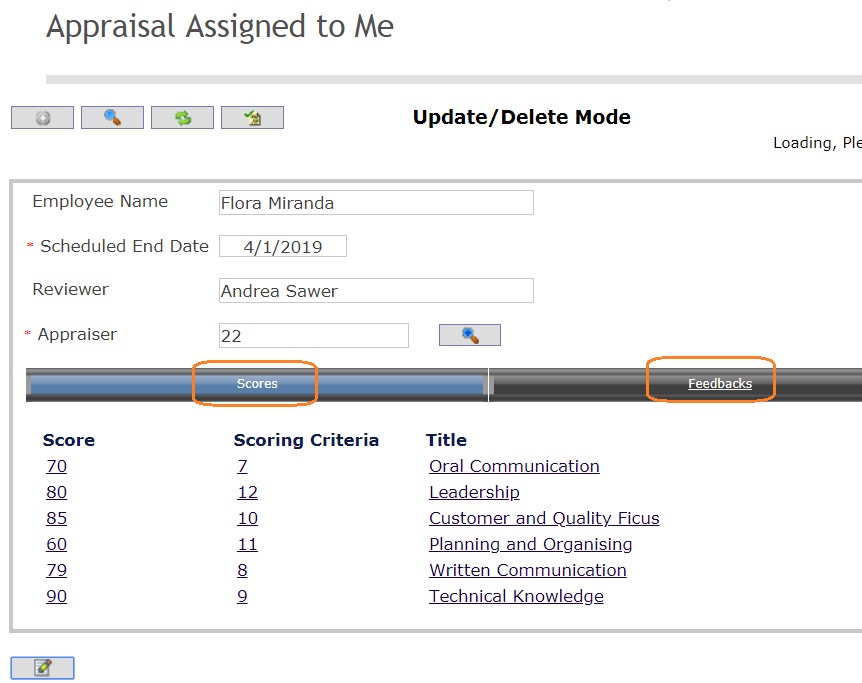
Note. The Appraiser waits until the employee himself and the peers have completed the assessments before sending it to the Senior Reviewer.