
FreeBalance Accountability Suite
Recherche
User login
 English
 Français
 монгол
 Português
 Español
Delete a Review Promotion
Thu, 2010-11-04 10:45 — slind
The Review Promotion screen holds the reviewers (people who participate but don't make final decision) of the promotion and their comments.
To DELETE a Review Promotion, follow the steps below:
Navigation 
By default, you will be in Search Mode.
- Find the Review Promotion you want to Delete
- Enter the information to be used as retrieval criteria in the appropriate field(s). If you prefer to see all Review Promotions, leave all fields blank.
- Click Find

- Select the Review Promotion you want to Delete
- Click on the Delete icon

- A window will appear asking you to confirm
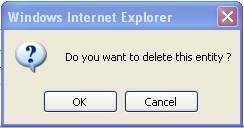
4. Click OK to confirm and delete the Review Promotion.
5. A window will be displayed confirming the Review Promotion has been deleted
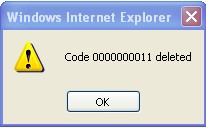
To Verify that the Review Promotion has been Deleted:
- Click on the Search icon

- Enter the Review Promotion information
- Click on the Find icon
- The window will appear
