
FreeBalance Accountability Suite
Хайлт
Хэрэлэгчийн нэвтрэлт
 English
 Français
 монгол
 Português
 Español
Generation of the Report
Баасан гариг, 2010-07-23 13:08 он сар өдөр - malzoubi хэрэглэгчийн нэр
The Recruitment Requisition Report shows the recruitment requisition general information, required degrees, certificates and skills, salary scale, financial information and comments.
To GENERATE the Recruitment Requisition Report, follow the steps below:
Navigation 
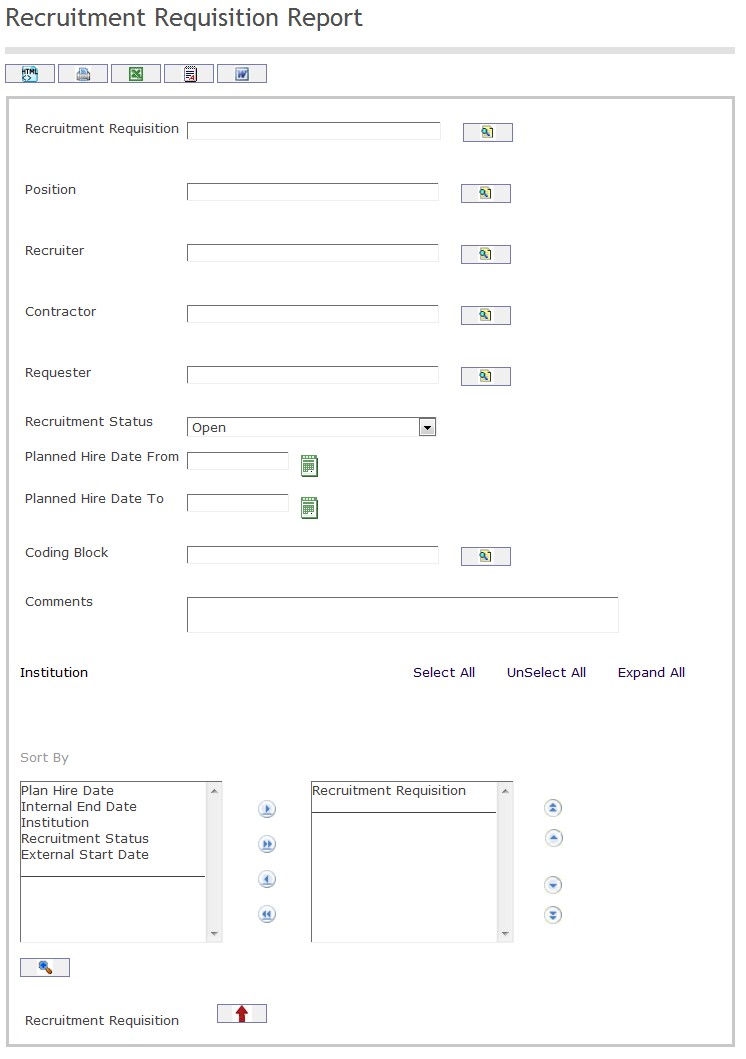
The Recruitment Requisition Report includes the following filter criteria available for the report:
- Recruitment Requisition - Recruitment Requisition (optional parameter) can be selected using the Lookup icon
 , and Find icon
  to retrieve the Recruitment Requisition . If selected, the report will include the selected Recruitment Requisition
 - Position - Position (optional parameter) can be selected using the Lookup icon , and Find icon to retrieve the Position. If selected, the report will include the selected Position
- Recruiter - Recruiter (optional parameter)can be selected using the Lookup icon , and Find icon to retrieve the Recruiter. If selected, the report will include the selected Recruiter
- Contractor - Contractor (optional parameter)can be selected using the Lookup icon , and Find icon to retrieve the Contractor . If selected, the report will include the selected Contractor
- Requester - Requester (optional parameter) can be selected using the Lookup icon , and Find icon to retrieve the Requester. If selected, the report will include the selected Requester
- Recruitment Status - Select Recruitment Status from drop-down menu
- Planned Hire Date From - Enter the Planned Hire Date From (optional parameter) that can be selected by using the calendar icon

- Planned Hire Date To - Enter the Planned Hire Date To (optional parameter) by using the calendar icon
- Coding Block - Coding Block (optional parameter)can be selected using the Lookup icon , and Find icon to retrieve the Coding Block. If selected, the report will include the selected Coding Block
- Comments - Enter comments related to recruitment requisition into the space provided.
- Sort By - Click the
 ,
,  ,
, ,
,  icons to add and remove filter criteria to / from the selected list and click the
  ,
,  ,
,  ,
,  icons to move the items in the selected list up and down to put them in the desired order of appearance
 - Sort the Recruitment Requisition by the preferred ascending and descending order using the red arrow icon.

If all filter criteria are left blank, all Recruitment Requisitions, Positions, Recruiter, Contractors, Requesters, Coding Blocks allowed by the report user security profile.
The report can be exported in HTML, PDF, MS Excel, RTF and MS Word formats, prior to printing, using the  ,
,  ,
,  ,
,  , and
, and  icons.