FreeBalance Accountability Suite
Search
User login
 English
 Français
 монгол
 Português
 Español
Create a Dispatch Order
Dispatch Orders manage the inventory leaving a particular warehouse to supply the goods requested by a Goods/Services Request
To CREATE a Dispatch Order follow the steps below:
Navigation 
- Click on the New icon
 (you will then be in Insert Mode).
 - Enter the new Dispatch Order information. Fields with an asterisk
 are mandatory fields.
 - The ID and the Dated Created will automatically generated.
- ID: Unique identification code of the Dispatch Order.
- Date Created: the date the dispatch order is created
4. Enter the Delivery Expected Date and Delivered Date as required.
- Delivery Expected Date: the date the delivery is expected to arrive. To enter the date, click on the Calendar icon
 and select the date.
 - Delivered Date: the date the order was delivered. To enter the date, click on the Calendar iconand select the date.
5. The Dispatch Order Status will be automatically generated.
- Dispatch Order Status: the current status of the dispatch order. For example Registered, Reserved, In Transit, Cancelled or Delivered.
6. To enter the Delivery By, click on the Lookup icon  , click on Find icon
  to retrieve the Employee list, then select the Delivery By employee.
- Delivery By: the employee who is responsible for delivering the goods
7. To enter the Receiving By, click on the Lookup icon , click on Find icon to retrieve the Employee list, then select the Receiving By employee.
- Receiving By: the employee who is responsible for receiving the goods
8. To enter the Requestor Institution, click on the Lookup icon , click on Find icon to retrieve the Institution list, then select the Requestor Institution.
- Requestor Institution: the institution that is requesting the goods
9. To enter the Supplier Institution, click on the Lookup icon , click on Find icon to retrieve the Institution list, then select the Supplier Institution.
- Supplier Institution: the institution suppling the goods.
10. Select the Language as required.
- Language: language used
11. Enter the Description and Remarks
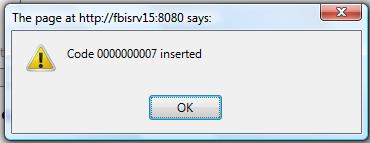
Click on the Save icon  at the bottom of the Dispatch Order page to save your new Dispatch Order information. A window will appear to confirm. Press OK