
FreeBalance Accountability Suite
Search
User login
 English
 Français
 монгол
 Português
 Español
Generation of the Report
Mon, 2010-10-18 14:36 — jcarr
The Promotion Proposal Report shows a list of employees who are eligible for a Promotion based on the Promotion Policy.
To GENERATE a Promotion Proposal Report, follow the steps below:
Navigation 
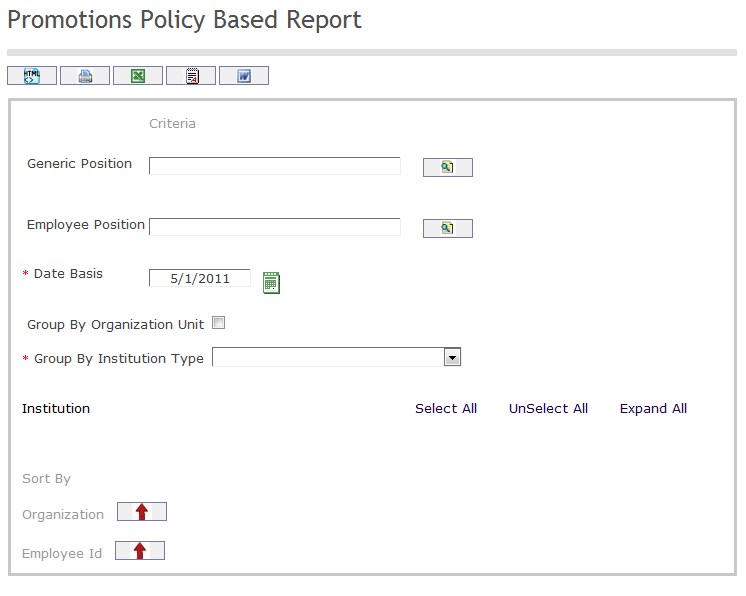
The Promotion Proposal Report includes the following filter criteria available for the report:
- Generic Position - Generic Position unique identification number (optional parameter) that can be selected using the Lookup icon
 , and Find icon
  to retrieve the Generic Position unique identification number. If selected, the report will include the selected Generic Position unique identification number and all Generic Positions reporting to the selected Generic Position. Refer to Generic Position for more information.
 - Employee Position - Employee Position unique identification number (optional parameter) that can be selected using the Lookup icon , and Find icon to retrieve the Employee Position unique identification number. If selected, the report will include the selected Employee Position unique identification number and all Employee Positions reporting to the selected Employee Position. Refer to Employee Position for more information.
- Date Basis - Enter Date that can be selected by using the Calendar icon
 .
. - Group By Organization Unit - Click the Group By Organization Unit checkbox to enable this function
- Group By Institution Type - Select a Group By Institution Type from the drop-down menu
- Sort the Employee ID by the preferred ascending and descending order using the red arrow icon.

Sort the Organization by the preferred ascending and descending order using the red arrow icon.

If all filter criteria are left blank, all Promotion Proposal Details will be included in the Report, as well as the Promotion Details allowed by the report user security profile.
The report can be exported in HTML, PDF, MS Excel, RTF and MS Word formats, prior to printing, using the
 ,
,  ,
,  ,
,  , and
, and  icons.