
FreeBalance Accountability Suite
Search
User login
 English
 Français
 монгол
 Português
 Español
Generation of the Report
The xls file produced will allow users to do verification for a specific payroll period. The xls file will be detailed by employee and no grouping will be allowed. Also no total will be generated. The reason is that the user will manipulate the data as he wants and produce the total for any grouping.
To GENERATE the Payroll Verification Report, follow the steps below:
Navigation 
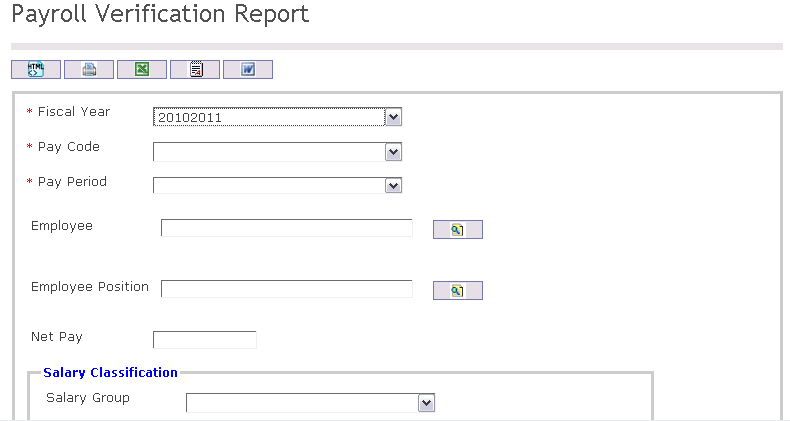

The Payroll Verification Report includes the following filter criteria available for the report:
- Fiscal Year - Select Fiscal Year from drop-down menu
- Pay Code - Select Pay Code from drop-down menu
- Pay Period - Select Pay Period from drop-down menu
- Employee - To enter the Employee, (optional field) click on the Lookup icon
 , click on Find icon
  to retrieve the Employee list, then select the Employee
 - Employee Position - To enter the Employee Position, (optional field) click on the Lookup icon , click on Find icon to retrieve the Employee Position list, then select the Employee Position
- Net Pay - Enter Net Pay
- Salary Group - Select Salary Group from drop-down menu.
- Salary Classification - Select Salary Classification from drop-down menu.
- Salary Step - Select Salary Step from drop-down menu.
- SCC Level 1 - Select a Situation Code Combination (Level 1) from the drop-down menu.
- SCC Level 2 - Select a Situation Code Combination (Level 2) from the drop-down menu.
- Is Apply Coding Block Restriction - Check the checkbox to apply a coding block restriction on this report.
- Sort By - Select a choice from the drop-down menu to sort the report by a specific selection. Sort the list items by the preferred ascending and descending order using the red arrow icon.

If all filter criteria are left blank, all Employees, Employee Positions, Cost Items, Deductions, Situation Code Combinations, Salary Transitions will be included in the Report, as well as the Institutions allowed by the report user security profile.
The report can be exported in HTML, PDF, MS Excel, RTF and MS Word formats, prior to printing, using the  ,
,  ,
,  ,
,  , and
, and  icons.